


This function is only available with the devices from the next series and when your installation is connected to the Studer web portal.
The “Smart Control” function, in “Tariff-based” mode, allows your system to automatically recharge the storage battery from the grid whenever the electricity price drops below a threshold that you define. Please note that your power consumption from the grid may be higher when this function is enabled, as the grid is used to charge your batteries when the tariff threshold you have set for recharging the batteries is reached. Here is how to enable it from the Studer web portal.
Prerequisites: Before activating Smart Control, you must authorise our web monitoring portal to monitor and modify your installation remotely. Some users have chosen to disable this feature, please ensure that it is enabled. A dedicated FAQ article for this is available here.
Procedure:
- Log in to the Studer web portal (portal.studer-innotec.com), then select the installation on which you want to enable the dynamic tariff.
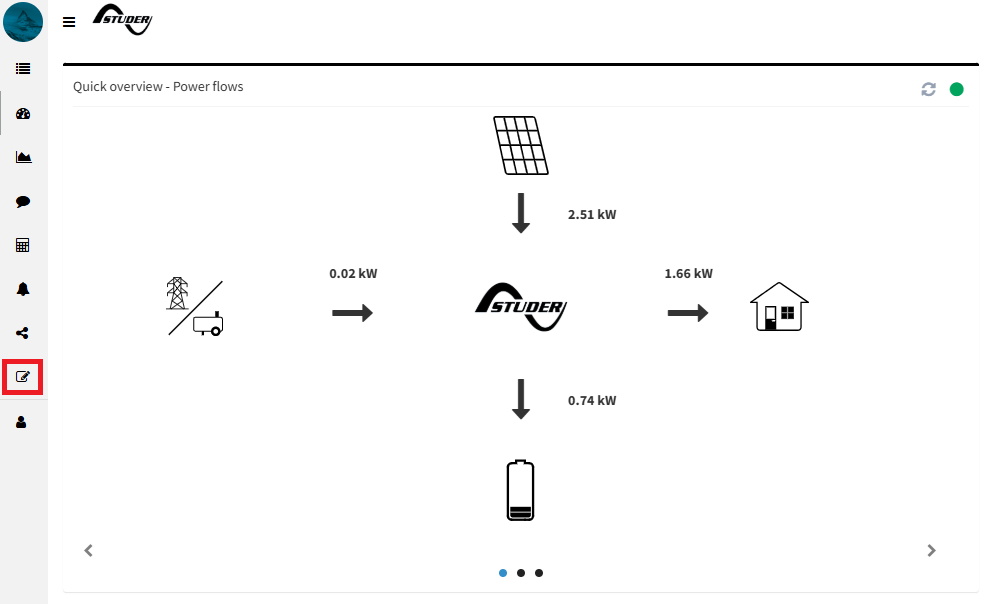
- Click the pencil icon, in the left-hand menu, to open the “Edit the installation” window.
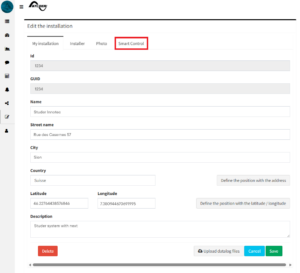
- In the edit window, click the “Smart Control” tab.
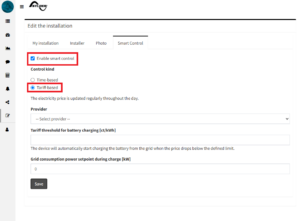
- Check the “Enable smart control” box, then select the “Tariff-based” option.
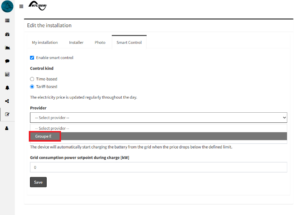
- From the “Provider” drop-down list, select your electricity provider. (Note: If your electricity provider does not appear in the list, please contact our technical support (support@studer-innotec.com) so that we can add it).
- Fill in the “Tariff threshold for battery charging [ct/kWh]” field: this is the price threshold below which the system will automatically start charging the battery from the grid.
- Fill in the “Grid consumption power setpoint during charge [kW]” field: this is the maximum power the system is allowed to draw from the grid to charge the battery once the tariff threshold for battery charging is met.
- Click “Save” to save the configuration.
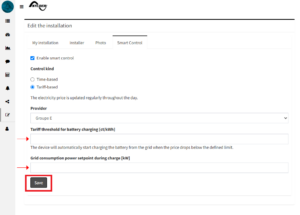
Your system will now use the grid to charge your batteries when the tariff threshold you have set for recharging the batteries is reached.